Overview
Curaytor boosts website traffic, qualified leads, and sales by combining websites, landing pages, blogs, CRM, email and SMS marketing, Facebook ads, and advanced lead conversion tools. With the BombBomb integration, you can easily send videos from Curaytor to connect with more people. Simply link our BombBomb API, and you can add videos to your blasts, whether new or pre-recorded, for a richer video library.
Who This Applies To
✅ Audience Type: Application Admin
✅ Plan Type: Core + Copilot, Enterprise
✅ Curaytor account with permission to access Settings
Connection Steps

In your BombBomb account, hover over your name in the bottom-left corner and select Profile.
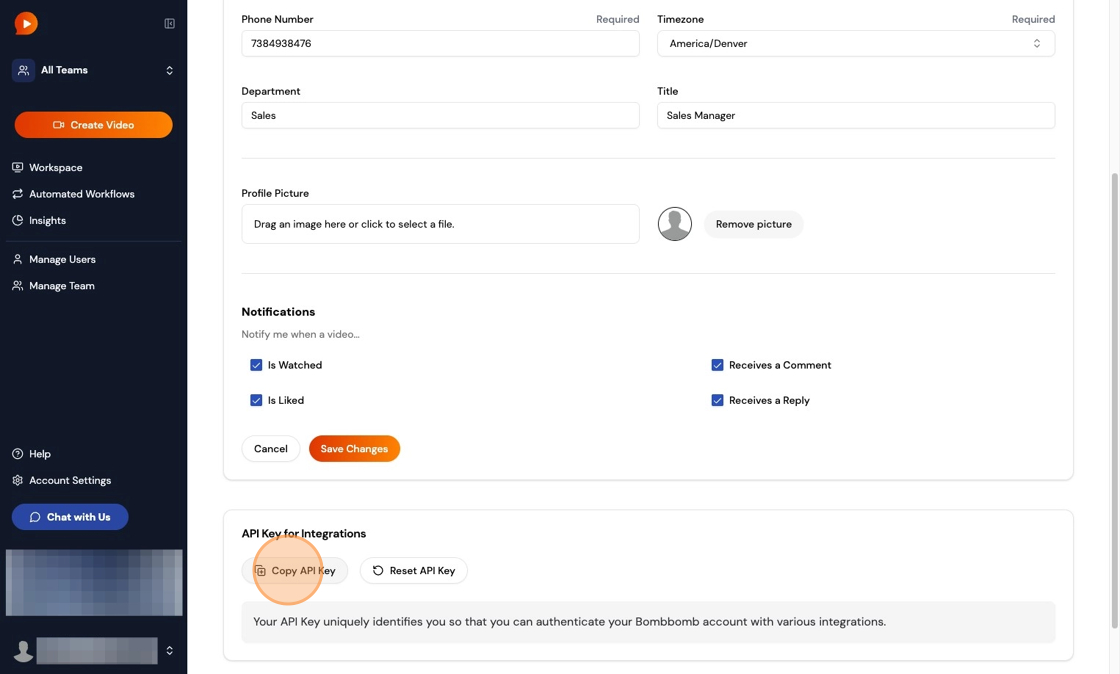
Scroll to the bottom of the Profile page. Under API Key for Integrations, click Copy API Key.
Log into your Curaytor account and click the Gear icon in the upper-right corner.
From the dropdown menu, select Settings.
5. Under the "Basic details" section, you'll see a field for the BombBomb API key. Paste the BombBomb API key into this field either by pressing Ctrl + V (Command + V for Mac users) or by right-clicking into the field and clicking "Paste." You will see a green checkmark indicating the API key has been synced.
6. Click Save to finish. The integration is now connected!
FAQs
Why don't I see the green checkmark in Curaytor?
Double-check that the key was pasted correctly and matches your active BombBomb account.
Can I use both new and pre-recorded videos?
Yes. Once connected, you can access your full BombBomb video library from within Curaytor.