Overview
The BoomTown integration lets you connect your BombBomb account so you can insert videos into BoomTown emails. Once connected, you can record new videos from BoomTown or select from your BombBomb library.
Who This Applies To
✅ Active BoomTown GROW plan or higher
✅ Active BoomTown account
✅ Access to your BombBomb API Key
Connection Steps
-
In your BombBomb account, hover over your name in the bottom-left corner and select Profile.

🗣️ Note: This is where you’ll find your personal settings and API key. -
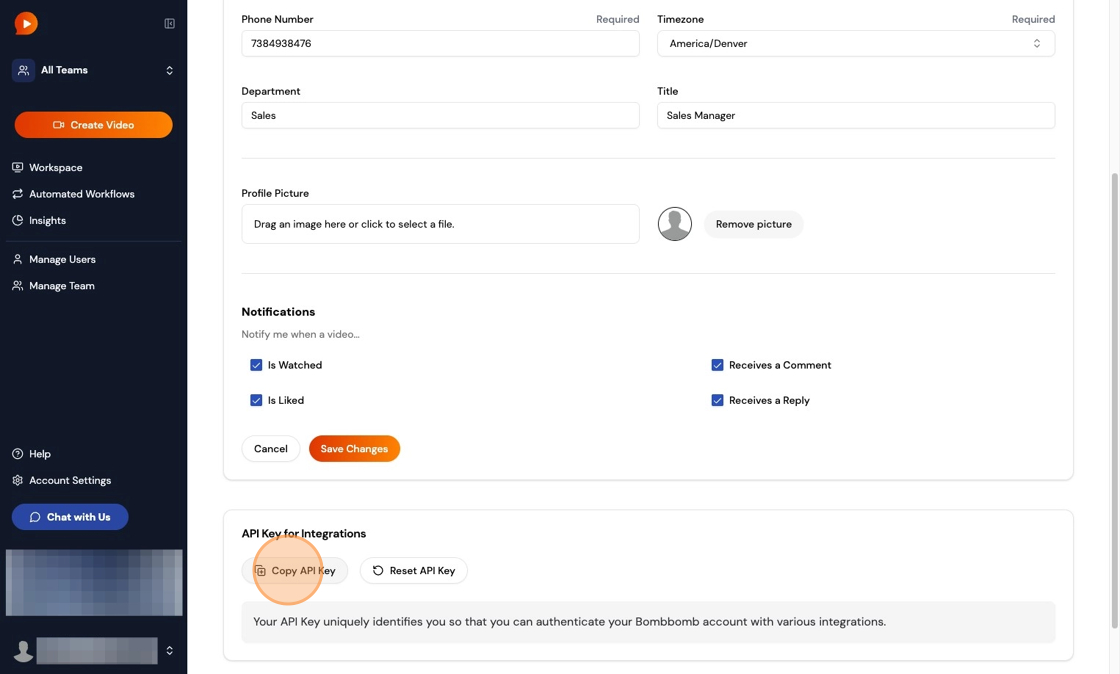
Scroll to the bottom of the Profile page. Under API Key for Integrations, click Copy API Key.
-
In BoomTown, log in and click your profile image at the top. From the drop-down menu, choose Lead Email Settings.

-
Paste your BombBomb API key into the provided field and click Save.

🗣️ Note: Your accounts are now connected.
FAQ
Do I need a specific BoomTown plan?
Yes, the integration requires a BoomTown GROW subscription or higher.Where can I find my API Key?
In BombBomb Engage, go to Profile → scroll to the bottom → API Key for Integrations.Does the integration sync my contacts?
No, the integration only allows you to insert BombBomb videos into BoomTown emails.